Best Claude Plugins for Marketing/GTM
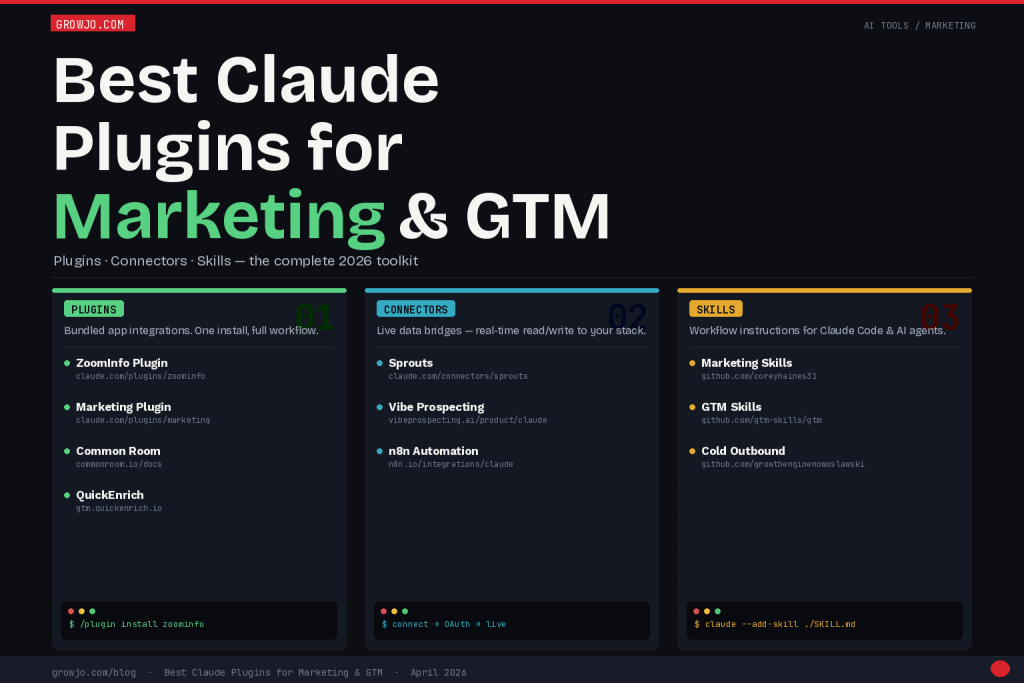
Table of Contents
What Are Claude Plugins, Connectors, and Skills?
Let’s clear up what Plugins, Connectors, and Skills actually are—because people use these terms interchangeably and that just wastes setup time.
Plugins are the heavy hitters. Introduced with Claude Cowork in January 2026, a plugin combines server connections, commands, sub-agents, and workflow logic in one installable package. Picture it like boxing up an app within Claude—once it’s running, Claude can talk to external services, tackle complex tasks, and work with specialized knowledge. For marketing, plugins handle stuff like contact enrichment, audience intel, and campaign briefs.
Connectors are lighter. They link Claude to a single platform in real-time, giving it live read-write access. It’s not all bundled together; a connector just makes Claude a bridge to your CRM or prospecting tool, so it can pull fresh data and take direct actions.
Skills are instruction files (usually markdown) that teach Claude how to follow a workflow, persona, or methodology. They’re easy to install—just drop a file in Claude Code—and super flexible. Marketing skills can coach outgoing email sequences, content strategy, SEO, CRO frameworks, and more.
Claude Plugins for Marketing/GTM
Claude Plugins are bundled integrations that combine server connections, commands, and workflow logic in a single install. They’re the fastest route for marketing teams to connect Claude to their GTM stack—no coding needed. All plugins here live in the Claude Plugin Marketplace, where you’ll find options for every category.
ZoomInfo Plugin
ZoomInfo is the kingpin in B2B contact intelligence, and the Claude plugin hooks its huge database of verified contacts, firmographics, technographics, and intent signals right into your workspace. That means your team doesn’t need to bounce between tools—just ask Claude to look up prospects, pull company profiles, or build target lists using ZoomInfo’s live data.
The coolest use case: you can combine ZoomInfo’s intent signals with Claude’s knack for personalized outreach. Ask Claude to spot accounts that are actively shopping for your service, grab the decision-makers, and draft custom emails—all in one chat. You can even push these enriched contacts straight into Salesforce or HubSpot without the usual manual hassle.
Best for: Enterprise sales teams, outbound SDRs, and RevOps teams who need verified CRM enrichment.
Install Command (Claude Desktop / Cowork)
/plugin install zoominfo
Manual Install via Plugin URL
1. Open Claude Desktop or claude.ai
2. Navigate to Settings → Plugins → Browse Marketplace
3. Search “ZoomInfo” or visit claude.com/plugins/zoominfo
4. Click “Install Plugin” and authenticate with your ZoomInfo account
5. Verify with: /zi-lookup [company name]
Marketing Plugin
Anthropic’s official Marketing Plugin is one of the original 11 plugins from the January 2026 Claude Cowork launch. It’s made for marketing teams who want Claude as a true collaborator—not just a content generator. This plugin covers campaign briefs, SEO workflows, content calendars, performance reviews, and enforcing brand voice.
What makes it special? Built-in workflows and sub-agents for different marketing needs. For instance, the content strategist can audit your calendar. The SEO agent runs keyword research and topic clusters. The brief builder creates structured plans from bare inputs. Slash commands like /content-brief, /seo-research, and /campaign-review make it all fast—you never have to fiddle with complicated prompts.
Best for: Marketing managers, content teams, and demand gen leads who want to ramp up production, planning, and review without juggling tons of tools.
Install Command
/plugin install marketing
Key Slash Commands After Install
/content-brief [topic] [audience] [goal]
/seo-research [keyword or topic]
/campaign-review [paste campaign details]
/brand-voice-check [paste copy]
Common Room Plugin
Common Room built a combined connector and plugin package for Claude—it’s one of the smartest GTM intelligence integrations around. Common Room is all about waterfall enrichment, dark funnel signals, job tracking, and product-led sales workflows, and its Claude plugin lets you tap all that through conversation.
The GTM use is huge: you can have Claude surface accounts with buying signals—think job changes, product usage spikes, website visits—create Spark Briefs using RoomieAI™ data, and run automated pipeline plays without leaving Claude. RevOps and SDR teams can prospect based on these real signals, which makes the plugin pretty actionable.
It works both ways: as a connector for real-time data, and as a plugin for slash commands tied to GTM workflows. You’ll find the install details on Common Room’s docs.
Best for: RevOps, SDRs, and demand gen teams hunting for signal-based prospecting, account-based marketing, and pipeline automation driven by live intent data.
Install via Claude Plugin Marketplace
/plugin install commonroom
Manual MCP + Plugin Setup
1. Visit: commonroom.io/docs/using-common-room/
common-room-for-claude-connector-and-plugin/
2. Generate your Common Room API token under Settings → API Tokens
3. In Claude Desktop, go to Settings → MCP Servers → Add Server
4. Add the Common Room MCP server URL and paste your API token
5. Enable the Claude Plugin from the same docs page
6. Test with: /cr-signals [account name or domain]
QuickEnrich — Enrich LinkedIn Public URLs Plugin
QuickEnrich has a free, open-source enrichment toolkit that tackles a notorious GTM pain: going from someone’s name and company to their LinkedIn, verified email, and phone—without paying enterprise prices. The standout tool for marketers and outbound folks is Tool 06: People Intel by Name. You upload names and companies, and get back LinkedIn URLs, emails, and dials.
The kicker is the pricing: it’s MIT-licensed and free forever, running in your browser with your own API keys. No seats, no per-record fees beyond your credits, zero vendor lock-in. You sign up, get 50,000 free enrichments—no credit card needed—which is enough to enrich a real list before you pay a dime. Plus, it’s self-hostable. RevOps teams can fork it, swap providers, and run it on their own setup.
For Claude users, the toolkit is easy to customize via AI coding agents. It’s got an AGENTS.md file mapping the integration points. You open it in Claude Code, ask Claude to tweak a component, and you’ve got a tailored enrichment tool in minutes.
Best for: SDRs, growth marketers, and founders needing to convert name + company to verified LinkedIn/email/phone for free, with no enterprise contract headaches. RevOps teams who want a self-hosted, fully controlled enrichment layer.
Use Directly in Browser (No Install Required)
1. Visit gtm.quickenrich.io
2. Sign up at app.quickenrich.io/promo for 50,000 free credits
3. Grab a free Serper API key at serper.dev
4. Open Tool 06: “People Intel by Name”
5. Paste your QuickEnrich + Serper API keys (stored locally, never on their servers)
6. Upload a CSV with columns: First Name, Last Name, Company
7. Download enriched records with LinkedIn URLs, emails, and direct dials
Self-Host / Customize with Claude Code
# Clone the open-source repo
git clone https://github.com/mattvinall/Quick-Enrich-Tools.git
cd Quick-Enrich-Tools
# Open in Claude Code to customize any provider
claude .
# Ask Claude Code:
# “Swap Supabase for Neon and Railway for Fly.io per AGENTS.md”
# MIT-licensed — fork, modify, ship your own version
Claude Connectors for Marketing/GTM
Claude Connectors are integrations using MCP that give Claude live, two-way access to external platforms. Unlike Plugins—which bundle workflows and ready-made commands—Connectors are about making a persistent data bridge. This way, Claude can pull real-time info or trigger actions inside your stack. For marketers and GTM teams, the most useful connectors are the ones linking Claude to your prospecting database, sales automation, or workflow manager.
Sprouts Connector
Sprouts is a B2B data platform built for GTM teams who need solid contact and company info without the nightmare of enterprise contracts. The Claude connector pulls Sprouts’ prospecting into Claude, so you can build lists, enrich leads, and qualify accounts just by chatting—instead of fighting a separate UI.
It shines for startups and mid-market teams who want to run research inside Claude. Ask for “20 VP of Sales at Series B SaaS companies in the US, 50-200 employees,” and you get a structured list, ready for action. Claude can also push those records back to your CRM or prep them for sequencing tools.
Best for: Startups, mid-market GTM teams, SDRs doing account research, and founders running outbound prospecting solo.
Install via Claude Connectors
1. Visit claude.com/connectors/sprouts
2. Click “Connect” and authenticate with your Sprouts account
3. Grant the requested data permissions
4. Connector is now active — test in Claude with:
“Using Sprouts, find [ICP description]”
Manual MCP Config (claude_desktop_config.json)
{
“mcpServers”: {
“sprouts”: {
“command”: “npx”,
“args”: [“-y”, “@sprouts/mcp-server”],
“env”: {
“SPROUTS_API_KEY”: “your_api_key_here”
}
}
}
}
Vibe Prospecting Connector
Vibe Prospecting is a newer player focused on “vibe-based” prospecting—using conversational AI to nail down ideal customer profiles, then match accounts with natural language instead of creating rigid filters. The Claude connector is all about that—turning Claude into a real prospecting engine.
What’s different? You define your ICP in plain English: “companies that just hired their first VP of Marketing, use HubSpot, and are scaling their sales.” Vibe parses that and searches their database. Claude surfaces the results right in your conversation, making it quick for teams who want to iterate on targets without data engineering headaches.
Best for: Founders, early SDRs, and sales leaders who want fast ICP targeting with zero fuss.
Install via Product Page
1. Visit vibeprospecting.ai/product/claude
2. Create or log in to your Vibe Prospecting account
3. Click “Connect to Claude” and follow the OAuth flow
4. In Claude, activate with:
“Connect to Vibe Prospecting and find accounts matching [description]”
MCP Server Config
{
“mcpServers”: {
“vibe-prospecting”: {
“command”: “npx”,
“args”: [“-y”, “@vibeprospecting/mcp”],
“env”: {
“VIBE_API_KEY”: “your_api_key_here”
}
}
}
}
n8n Claude Connector
n8n is an open-source automation platform that lets you connect Claude with almost anything—over 1,000 tools, including Google Sheets, Gmail, Slack, HubSpot, Airtable, Salesforce, Notion, and more. n8n handles the “plumbing,” Claude brings the intelligence.
The best use: automating multi-step GTM workflows. Example: Monitor a Google Sheet of leads, pass each one to Claude for scoring, write results back, ping the right rep on Slack. Or take HubSpot deals, use Claude to draft custom follow-ups based on LinkedIn activity, and schedule the send. You handle the workflow logic in n8n; Claude tackles the smart stuff.
n8n integrates with Claude via the HTTP Request node to the Anthropic API. That makes it crazy flexible—Claude can join any n8n flow, receive context, and send actionable output.
Best for: Marketing ops and RevOps teams who want to automate GTM workflows, plug Claude into their martech stack, or build AI scoring/routing pipelines—without custom engineering.
Self-Hosted n8n Setup
# Install n8n globally
npm install n8n -g
# Start n8n
n8n start
# In n8n workflow builder:
# 1. Add an “HTTP Request” node
# 2. Set Method: POST
# 3. URL: https://api.anthropic.com/v1/messages
# 4. Add Header: x-api-key = {{ $env.ANTHROPIC_API_KEY }}
# 5. Add Header: anthropic-version = 2023-06-01
# 6. Body: JSON with model, messages, max_tokens
n8n Cloud (No-Code Setup)
1. Sign up at app.n8n.cloud
2. Create a new workflow
3. Add “HTTP Request” node → configure for Anthropic API
4. Add your Anthropic API key as a credential
5. Chain upstream/downstream nodes for your GTM workflow
6. Activate workflow and test with sample data
Claude Skills for Marketing/GTM
Claude Skills are instruction files (usually markdown) that tell Claude how to run a defined workflow, role, or methodology. They’re dead simple: drop a file into Claude Code, no API keys or OAuth needed, and you’re set. Skills are the fastest way to turn Claude into a domain expert who follows your playbook.
The skills below are open-source, live on GitHub, and work with Claude Code and any MCP-enabled AI setup.
Marketing Skills — coreyhaines31/marketingskills
Corey Haines’ Marketing Skills collection is the go-to toolkit for marketing inside Claude Code. It covers conversion rate optimization (CRO), copywriting, SEO research, analytics, and growth engineering. Each skill is a standalone set of instructions that you load as needed.
The CRO skill is especially good—it teaches Claude to analyze landing page copy, spot friction in conversion flows, suggest A/B tests, and apply CRO frameworks. The SEO skill brings real keyword research and clustering tactics, so Claude can build topic clusters, content briefs, and a solid internal linking plan grounded in actual SEO standards.
Best for: Growth marketers, content folks, and SEOs who want Claude to think like a specialist—not just toss out generic advice.
Install via Claude Code
# Clone the skills repo
git clone https://github.com/coreyhaines31/marketingskills.git
# Install all marketing skills into Claude Code
claude –add-skill ./marketingskills/cro/SKILL.md
claude –add-skill ./marketingskills/copywriting/SKILL.md
claude –add-skill ./marketingskills/seo/SKILL.md
claude –add-skill ./marketingskills/analytics/SKILL.md
Quick Install (Single Command)
claude –plugin-dir ./marketingskills
GTM Skills — gtm-skills/gtm
The GTM Skills repo is a complete kit for go-to-market agents. It handles account research, competitive intel, outreach, and CRM management—the full slate of a modern SDR or GTM lead’s typical work. These skills are built for Claude Code and multi-agent setups, so different sub-agents can tackle different GTM jobs at the same time.
Highlights: The account research module teaches Claude to pull info from news, LinkedIn, job postings, and technographics into a structured account brief. The competitive intelligence skill lets Claude track and compare competitor positioning. The CRM skills maintain CRM hygiene—flagging stale records and suggesting updates based on recent activity.
Best for: GTM leads, sales engineers, and RevOps teams wanting a complete workflow for account research, competitor analysis, and CRM maintenance powered by AI.
Install via Claude Code
# Clone the GTM skills repo
git clone https://github.com/gtm-skills/gtm.git
# Install the full GTM toolkit
claude –plugin-dir ./gtm
# Or install individual skills
claude –add-skill ./gtm/account-research/SKILL.md
claude –add-skill ./gtm/competitive-intel/SKILL.md
claude –add-skill ./gtm/crm/SKILL.md
claude –add-skill ./gtm/outreach/SKILL.md
Cold Outbound Skills — growthenginenowoslawski/coldoutboundskills
Growth Engine’s Cold Outbound Skills set is one of the most focused in the Claude Code ecosystem. Instead of generic email templates, it encodes a specific outbound system: hypothesis-driven ICP targeting, pattern-break subject lines, problem-first messaging, and multi-touch sequences.
You use these skills end-to-end: start by testing your ICP with the targeting skill, then move to messaging frameworks to draft value props and proof points, finally build a full outreach sequence (email, LinkedIn, phone touches) that fits your persona and sales cycle. The result is a strategic sequence, not filler copy.
The repo also includes deliverability skills—domain warm-up, sending volume ramp, SPF/DKIM checklists—which is handy for SDR managers and founders building outbound foundations.
Best for: SDRs, AEs, and founders doing cold outbound, and sales ops teams setting up outbound from scratch who want sequenced, purposeful outreach—not generic spam.
Install via Claude Code
# Clone the cold outbound skills repo
git clone https://github.com/growthenginenowoslawski/coldoutboundskills.git
# Install all skills
claude –plugin-dir ./coldoutboundskills
# Or install by workflow stage
claude –add-skill ./coldoutboundskills/icp-definition/SKILL.md
claude –add-skill ./coldoutboundskills/messaging-framework/SKILL.md
claude –add-skill ./coldoutboundskills/sequence-builder/SKILL.md
claude –add-skill ./coldoutboundskills/deliverability/SKILL.md
Comparison Table
| Tool | Type | Best For | Install Complexity | Cost |
|---|---|---|---|---|
| ZoomInfo Plugin | Plugin | Enterprise prospecting & enrichment | Low (1-click auth) | Requires ZoomInfo subscription |
| Marketing Plugin | Plugin | Campaign briefs, content, SEO | Very low (built-in) | Included with Claude Pro/Team |
| Common Room Plugin | Plugin + Connector | Signal-based prospecting, ABM | Medium (API token setup) | Requires Common Room plan |
| Sprouts Connector | Connector | Mid-market list building | Low (OAuth) | Requires Sprouts account |
| Vibe Prospecting | Connector | Natural language ICP targeting | Low (OAuth) | Requires Vibe account |
| n8n Connector | Connector / Automation | GTM workflow automation | Medium-High (workflow build) | Free (self-hosted) / n8n Cloud |
| QuickEnrich Plugin | Plugin / Free Tool | Name → LinkedIn URL + email + phone | Very low (browser-based) | Free (50K credits, open source) |
| Marketing Skills | Skill | CRO, SEO, copywriting, analytics | Very low (git clone + command) | Free (open source) |
| GTM Skills | Skill | Account research, competitive intel, CRM | Very low (git clone + command) | Free (open source) |
| Cold Outbound Skills | Skill | Sequenced outbound, ICP definition | Very low (git clone + command) | Free (open source) |
Final Thoughts
The Claude extension ecosystem has moved fast, and in 2026 marketing and GTM teams finally have real power at their fingertips—not just beta integrations. The main pattern: teams get the most value pairing a data connector (for live prospecting or CRM feeds) with a skill or plugin (for structured workflow execution). One without the other’s just not enough.
If you’re new, the fastest way to get productive is to install the Marketing Plugin for daily content and campaign work, add a connector that fits your prospecting stack, and layer in Cold Outbound Skills or GTM Skills if you’re running outbound. That’s 90% coverage of what modern GTM teams need from Claude—no engineers required.
If you already pay for ZoomInfo or Common Room, their Claude plugins are your highest-ROI move right now. They transform what you’ve got into Claude-native workflows instead of more tab fatigue.
As Anthropic keeps growing the plugin marketplace and more GTM tools build integrations, it’s only going to get better. The best teams are leaning in—turning Claude into the backbone of their go-to-market operation.